


Homestyler - Home Design Game
3.33.03K Reviews
App Specs
- Version
- 13.6.0
- Updated On
- License
- Free
- Downloads
- 10,000,000+
- Developer
- HomestylerApp
- Categories
- House & Home
- Platform
- Android, iOS
Screenshots


 Analysis by AppCompare
When I’m deciding whether to try a home-design app, I first ask what I actually need from it: a playful way to explore ideas, a visual aid for a real room, or precise planning I can rely on before spending money. Homestyler sits most comfortably between creative play and early-stage visualization. It makes experimenting with rooms approachable, but I wouldn’t treat a polished virtual result as a substitute for checking measurements, materials, and practical constraints in person.
That distinction matters if you’re browsing for a House & Home app. HomestylerApp has built a design experience that can appeal to curious beginners as well as people who already enjoy arranging furniture and color. The app is free to start, rated for Everyone, and has been installed over 10 million times. Its average rating is 3.4 from around 91,000 ratings, which suggests it has attracted a large audience without being a perfect fit for every user. I’d go in expecting an accessible creative tool, not a flawless professional planner.
Choose it for exploration, not final measurements
A useful way to judge Homestyler is to think about the decision you’re trying to make. If you want to compare a calm, neutral room with a bolder version, test how a sofa might look against a different wall color, or simply spend time making a space feel coherent, the app’s visual approach makes sense. If you need construction drawings, exact measurements, or a dependable materials list, a dedicated planning tool or advice from a professional is a better match.
This is also where the distinction between a design game and a practical home-improvement app becomes important. Homestyler encourages experimentation and makes the process feel inviting. That can help you discover preferences before you shop, but a virtual room can make choices seem more certain than they are. I’d use it to narrow down ideas, then check dimensions and real-world samples before committing to furniture, paint, or renovation work.
Getting Started: A Seamless Introduction to Design
Firing up Homestyler for the first time is like stepping into a world where your Pinterest dreams come true. The app doesn’t just throw you into the deep end; it gently guides you with a user-friendly interface that’s perfect for beginners and pros alike. Whether you're looking to redesign your own space or experiment with fantasy designs, this app has you covered.
Features That Make You Go "Wow!"
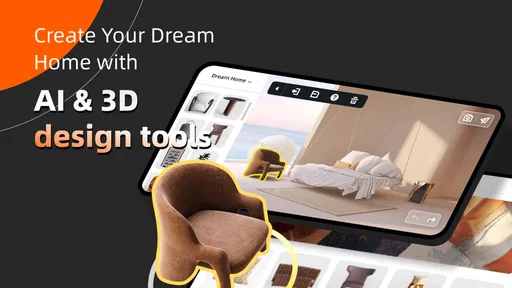
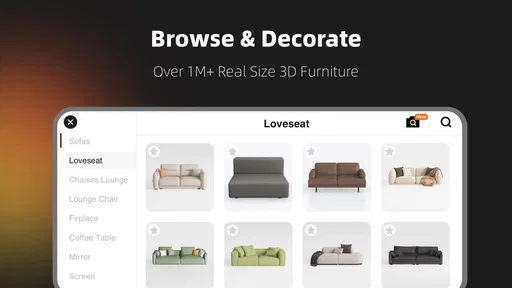
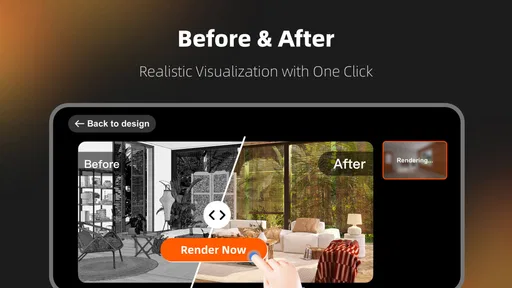
The standout feature of Homestyler is its vast library of furniture and decor items. You can practically furnish your entire home with the options available, from sleek modern pieces to cozy vintage finds. The app's ability to visualize these items in a 3D space is nothing short of revolutionary. You can rotate, zoom, and get a real feel for how each piece will fit into your design.
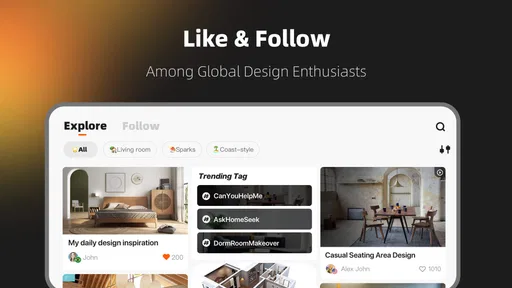
But the magic doesn’t stop there. The app also offers a community feature where you can share your designs and get feedback. It’s like having a team of designers at your fingertips, offering tips and encouragement. And let's not forget the tutorials! They are super handy for anyone who wants to delve deeper into the world of interior design.
Worth Reading Before You Choose

Baby Panda World Brings Quick Play to Modern Phones, but Its Game Library Feels Busy

ESPN’s Live Game View Makes Following Close Games Easier

QuizzLand Review: A Good Fit for Short Trivia Breaks, Not Every Player

Basketball Stars: Multiplayer Is Fast, but Can It Recover When Matches Go Wrong?

WEBTOON Turns Phone Updates Into a Better Reading Routine

Link to Windows Runs on Shared Habits, Not Social Feeds
The catalog is most useful when you treat it as a comparison tool rather than a shopping list. I’d try a few very different silhouettes in the same spot before settling on a style: a bulky chair can make a room feel crowded even when its color works, while a visually lighter option may leave the layout feeling calmer. A helpful habit is to keep the room’s main elements steady while changing one variable at a time. That makes it easier to see whether the difference comes from the furniture, the palette, or the overall balance.
For feedback, I’d share a design with a specific question instead of asking people whether they like the whole room. Asking whether the seating arrangement feels balanced, for example, gives others something useful to respond to. Community reactions can be a source of ideas, but they remain opinions; your own needs, taste, and room constraints should decide what stays.
Designing: Where the Real Fun Begins
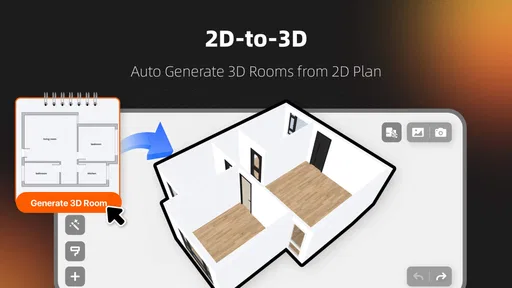
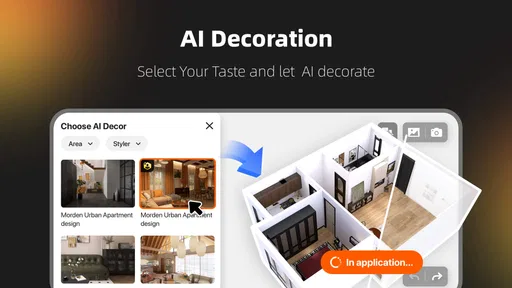
Once you’ve picked your room layout, the app lets you dive into the details. You can choose wall colors, flooring, and even lighting options. The customization is endless, and it’s easy to lose hours tweaking every little detail to perfection. It’s not just about throwing things together; it’s about creating a space that feels uniquely yours.
One of the coolest features is the augmented reality (AR) mode. You can literally walk around your designs, seeing them in your real-world space. It’s a surreal experience that takes the guesswork out of whether a piece will fit or not. Trust me, it’s incredibly satisfying to see your dream room materialize right in front of you.
I’d still separate visual fit from physical fit. AR can help me imagine how an item relates to the room around it, but I would not assume that a convincing on-screen placement proves a real product will fit through a doorway, clear a radiator, or leave enough walking space. Before buying, I’d record the actual room and item measurements and compare them separately. That extra check is especially worthwhile for narrow rooms, awkward corners, or spaces shared by several people.
A realistic way to use the app is to plan a small refresh after work rather than attempt an entire home at once. I might take one room that feels cluttered, decide what must stay, then try a few arrangements and color directions before discussing the best option with someone I live with. Saving attention for the room’s everyday purpose—where people walk, sit, work, and put things down—keeps the design from becoming attractive but inconvenient.
Learning While Playing
What I love about Homestyler is that it’s not just a game; it’s an educational tool. It subtly teaches you about balance, color theory, and spatial awareness without ever feeling like a lesson. You get to experiment with different styles and see what works together, enhancing your design skills as you play.
Even if you’re not planning to become a professional designer, the skills you pick up here are practical for everyday life. Next time you’re buying a couch or painting a room, you’ll have a much better idea of what you’re looking for.
For a beginner, one low-pressure exercise is to recreate the feeling of a room you already enjoy, then deliberately change one feature at a time. Keep the basic arrangement and test a warmer wall color, a different floor choice, or a more restrained set of accents. This turns browsing into a way to notice your own preferences. It can also reveal when a room looks appealing in isolation but clashes with the atmosphere you want at home.
There is a trade-off in that freedom: it’s easy to keep adjusting details because the next version always feels possible. I find it more useful to set a small goal before opening a project, such as choosing between two layouts or finding a direction for a living-room palette. That gives the session a stopping point and makes the result easier to discuss or act on.
Where other home-design tools may fit better
Homestyler is strongest when you want a visual, hands-on space to explore decor ideas. Compared with browsing furniture photos or mood boards, arranging objects in a room gives you a stronger sense of composition. Compared with a basic sketch or note-taking app, it is more immersive and easier to use for imagining a finished look. But those alternatives can be quicker when all you need is a color reference, a shopping note, or a simple record of measurements.
For serious renovation planning, a floor-plan-focused tool may be the better choice because that kind of work depends on exact dimensions and technical detail. For choosing a specific item to buy, the retailer’s own product information and measurements matter more than a convincing scene. I’d use Homestyler to explore the visual direction, then switch tools when the question becomes “Will this fit exactly?” or “What materials and quantities do I need?” The best alternative depends on the job, not on which app has the most appealing presentation.
It may also be the wrong choice if you dislike spending time arranging objects on a screen or want a finished answer without experimentation. The creative process is the point, so users who only need a quick measurement calculator or a straightforward checklist will probably prefer a simpler utility. Likewise, anyone making decisions that affect safety, structural work, or costly renovations should treat a design mock-up as inspiration, not technical guidance.
What to expect before you commit
The app is free to download, with optional in-app purchases ranging from $0.99 to $179.99 per item. I’d begin with the free experience and decide whether any paid option addresses a real need rather than buying simply because a design session has become absorbing. The range makes it sensible to check the cost of an individual purchase carefully before confirming it, especially if you’re sharing a device or letting a younger family member explore.
Homestyler is rated for Everyone, but that doesn’t mean every feature will suit every household or every design goal. A child can enjoy creative room styling, while an adult planning a move may use the same visual tools for a more practical conversation. The important distinction is that playful design and real-world planning are different tasks, even when they happen in the same app.
The current version is 13.1.0, and it runs on operating systems from version 7.0 onward. The app has been available since July 30, 2013, so it is an established product rather than a newly launched experiment. That history and its 3,000 reviews offer useful context, but neither guarantees that every workflow will feel right for you; I’d still judge it by whether the interface and design process match how you like to work.
Wrapping It Up: Is It Worth Your Time?
So, is Homestyler worth downloading? Absolutely! Whether you’re a design enthusiast or just looking for a new hobby, this app offers endless possibilities for creativity. It’s a fun, engaging way to explore interior design, and you might even learn something new along the way.
The app is free with optional in-app purchases, which means you can enjoy most features without spending a dime. But given how much value it provides, you might find yourself wanting to unlock more options to take your designs to the next level.
In conclusion, Homestyler is more than just a game; it’s an invitation to express your creativity and bring your interior design fantasies to life. So why not take the plunge and see what amazing spaces you can create?
My clearest recommendation is to try it when you have a specific room or design question in mind, even a small one. A first project could be comparing two furniture arrangements for a living area, or testing whether a softer palette makes a room feel more restful. Those modest experiments show quickly whether you enjoy the app’s visual way of working, and they produce ideas you can carry into a real conversation or shopping trip.
If you already know you need exact construction planning, a complete inventory, or professional-level documentation, I would choose a tool built for that job instead. If what you want is a creative place to test combinations and develop a clearer sense of your taste, Homestyler is a more appealing starting point than a plain list of ideas. I’d recommend it to curious decorators and casual users who enjoy trying options; I’d skip it if I wanted a fast, strictly practical answer with no design process involved.
Pros
- User-friendly interface for easy navigation.
- Wide range of design elements and furniture.
- Realistic 3D visualization of designs.
- Regular updates with new features.
- Community sharing for inspiration and feedback.
Cons
- Requires internet for most features.
- Limited free content; many items are paid.
- Occasional crashes on older devices.
- Some features can be complex for beginners.
- Ads can interrupt the design process.
FAQs for Homestyler - Home Design Game
What is Homestyler - Home Design Game, and how does it work?
Homestyler - Home Design Game is a mobile application designed for both Android and iOS that allows users to create and visualize interior design ideas. Using a vast array of furniture, decor items, and textures, users can design rooms in 3D. The app also features a community where users can share their creations and gain inspiration from others.
Is Homestyler suitable for professional designers or just for casual users?
Homestyler caters to both professional designers and casual users. Professionals can use it to experiment with design concepts and present ideas to clients, while casual users can enjoy redesigning their living spaces for fun or to plan actual home renovations. Its intuitive interface makes it accessible for all skill levels.
Are there any costs associated with using Homestyler?
Homestyler offers both free and premium features. The basic version is free and provides access to a wide range of design elements. However, there are in-app purchases and subscriptions available that unlock additional high-quality assets and advanced features, which can enhance the design experience significantly.
Can I use Homestyler offline, or do I need an internet connection?
While some features of Homestyler can be used offline, such as basic design tools, an internet connection is required to access the full range of assets, save your designs to the cloud, and participate in the online community. For the best experience, it is recommended to use the app while connected to the internet.
How does the community feature in Homestyler enhance the user experience?
The community feature allows users to share their designs, receive feedback, and gain inspiration from others worldwide. It fosters creativity and collaboration by enabling users to explore trending designs and participate in design challenges. This interactive component not only enhances learning but also keeps users engaged and motivated.


